
Blade Tracer
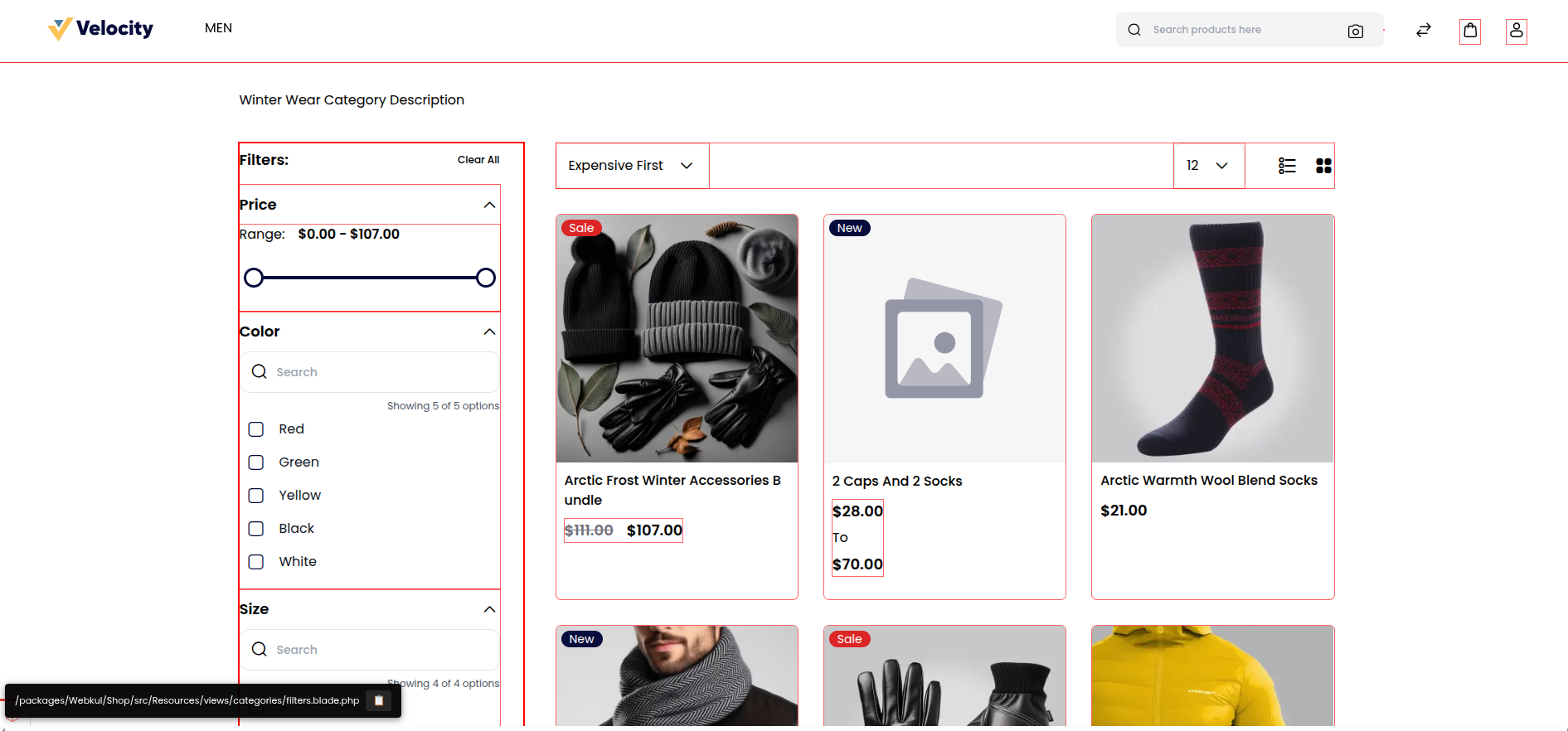
The Blade Tracer writes the path of every rendered Blade file into the page's HTML and, on the storefront, shows that path when you hover over an element. Use it during development to find the view or component behind any part of a page, for example before overriding it in a theme.
Where It Lives
| Piece | Where | What it does |
|---|---|---|
| Switch | tracer in config/view.php | false by default |
| Compiler | Webkul\Core\View\Compilers\BladeCompiler, bound as blade.compiler in packages/Webkul/Core/src/Providers/CoreServiceProvider.php | While the tracer is on, appendFilePath() adds a data-blade-path attribute holding the file's path, relative to the project root, to the first HTML element of each compiled view, or wraps the view in a <span> that carries it |
| Overlay | core::blade.tracer.style, in packages/Webkul/Core/src/Resources/views/blade/tracer/style.blade.php | Draws the outlines and the hover label, and adds the copy shortcut. It is added through the bagisto.shop.layout.body.after and bagisto.admin.layout.head render events |
Enabling the Tracer
The value isn't read from the environment, so change it in the file:
File: config/view.php
<?php

return [
    'tracer' => true,

    // ...
];
The path is written into each view when Blade compiles it, so clear the views compiled before the change:
php artisan view:clearIf your configuration is cached, run php artisan optimize:clear instead, so the new value is read as well.
Using the Tracer
On a storefront page:
- Every traced element has a thin red outline, drawn thicker while you hover over it.
- Hover over an element. A label at the bottom left of the window shows the Blade file that rendered it, such as
/packages/Webkul/Shop/src/Resources/views/components/layouts/header/desktop/bottom.blade.php. - Click the clipboard icon in the label, or press Ctrl + Shift + C (Cmd + Shift + C on macOS) while hovering, to copy the path.
To override the file you found, place a copy at the same relative path in your theme; see How Views Are Resolved. A path under views/components/ belongs to a Blade component, whose override path in the theme drops the components segment.
Disabling the Tracer
Set 'tracer' => false and run php artisan view:clear again. Until the views are recompiled, they keep their attributes.
Things to Watch
- Development only. The attributes expose your directory layout to anyone who reads the page source. Never enable the tracer in production.
- Every compiled view is traced, including the emails and PDF documents rendered from Blade. Turn the tracer off before you test mail output.
- Most admin pages show no overlay. The overlay is attached to the
bagisto.admin.layout.headevent, which only the admin's anonymous layout for the sign-in pages fires; the main admin layout firesbagisto.admin.layout.head.beforeand.after. Thedata-blade-pathattributes are still in the HTML, so inspect an element in your browser's developer tools to read them. - Vue-rendered markup is traced on its root only. The attribute lands on a component's
<v-…>element, and Vue passes it on to the root element the component renders from itsx-template, so the elements inside show the component's own path; a component with several root elements shows the nearest traced ancestor instead. Search thecomponentsdirectories for thev-name to find its template. - The copy shortcut is always taken on the storefront. The overlay's script is added to every storefront page, even while the tracer is off, and it claims Ctrl + Shift + C (Cmd + Shift + C), which is also the browser's inspect-element shortcut. Open the inspector from the context menu or with F12 instead.
Related Pages
- Blade Components: the components behind most
components/paths. - View Render Events: add markup next to a view without overriding it.
- Debugging Tips: the debug bar and the other debugging tools.